Education Line Black Icon Set: A Practical Guide for Designers and Educators
In the fast-paced world of digital content creation, visual consistency is often the difference between a professional presentation and a cluttered mess. Whether you are designing an e-learning module, updating a school website, or creating marketing materials for an educational tech startup, finding the right graphical elements can be surprisingly difficult. This is where the Education Line Black Icon Set steps in as a versatile solution. It is not just a collection of images; it is a curated toolkit designed to bridge the gap between aesthetic appeal and functional clarity.
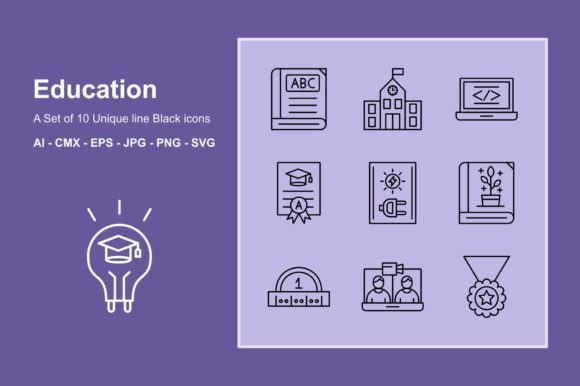
This set includes ten distinct icons that cover the broad spectrum of modern education. From traditional symbols like the Book and Ruler to contemporary necessities like Video Conference and Coding, these vectors address the hybrid nature of learning today. Because they are fully layered and vector-based, they offer a level of flexibility that raster images simply cannot match. Let’s explore how this specific icon set can solve real-world design problems across various industries.
Bridging Traditional and Digital Learning Environments
One of the most compelling aspects of this collection is its balanced representation of old-school academia and new-age technology. Consider the Report Card and Medal icons alongside the Coding and Video Conference symbols. This juxtaposition is crucial for institutions that are transitioning from physical classrooms to hybrid models.
For university administrators or instructional designers, using a cohesive visual language helps reduce cognitive load for students. When a student sees a consistent line style for both their grades (Report Card) and their virtual labs (Coding), it creates a seamless user experience. The Education Line Black Icon Set allows you to maintain this visual harmony without having to mix and match icons from different sources, which often results in clashing line weights and styles.
Enhancing E-Learning Platforms and LMS Interfaces
Learning Management Systems (LMS) like Canvas, Moodle, or Blackboard often suffer from generic, sterile interfaces. Customizing these platforms with high-quality icons can significantly improve navigation and user engagement. The Light Bulb icon, for instance, is perfect for highlighting "Tips" or "Key Takeaways" sections within a course module. Similarly, the Book icon serves as an intuitive button for accessing reading lists or digital libraries.
Because these icons are resizable without losing quality, they look crisp on both desktop monitors and mobile devices. This is critical for adult learners who may be accessing course materials on tablets during their commute. The SVG format, included in the package, ensures that the icons remain sharp at any resolution, providing a premium feel to the educational platform.
Applications in Educational Marketing and Branding
Marketing teams for schools, tutoring centers, and ed-tech companies need assets that communicate value quickly. The Medal and Report Card icons are powerful symbols of achievement and accountability. Using these in brochures, social media posts, or email newsletters can subtly reinforce the message of success and progress.
Imagine a coding bootcamp promoting its next cohort. Using the Coding icon paired with the Light Bulb can visually represent "innovative thinking through technology." The clean, black line style of the Education Line Black Icon Set works exceptionally well against colored backgrounds, allowing marketers to align the graphics with their brand colors easily. Since the files are editable, you can change the stroke color to match your corporate identity instantly.
Streamlining Presentation Design for Educators
Teachers and professors spend countless hours creating slide decks. A common pitfall is using low-resolution clipart that becomes pixelated when projected onto a large screen. With the Education Line Black Icon Set, educators can drag and drop high-quality vectors directly into PowerPoint or Keynote (after converting from AI or EPS if necessary, though PNGs are provided for ease of use).
The Ruler and Botanical icons are particularly useful for specific subjects. A biology teacher might use the Botanical icon to introduce a unit on plant life, while a math teacher could use the Ruler to signify geometry lessons. The Electricity icon is a boon for physics instructors, offering a clear, recognizable symbol for energy units. By standardizing these visuals, educators create a more professional and organized learning environment.
Technical Flexibility and Workflow Integration
For graphic designers, the technical specifications of an asset are just as important as its appearance. This set comes in six file formats: AI, EPS, CMX, JPG, PNG, and SVG. This variety ensures compatibility with almost any design software. If you work primarily in Adobe Illustrator, the AI files are fully layered, allowing you to deconstruct and modify individual elements. For CorelDraw users, the CMX and EPS formats provide native support.
The fact that these are fully layered is a significant advantage. It means you are not stuck with a static image. You can isolate the Video Conference camera from its stand, or adjust the thickness of the lines in the School building to better fit your layout. This level of control is essential for custom web design projects where unique interactions are required.
Considerations Before Implementation
While the Education Line Black Icon Set is highly versatile, it is important to consider context. The black line style is minimalist and modern, which works best for clean, contemporary designs. If your project requires a playful, cartoonish, or highly colorful aesthetic, you may need to invest time in recoloring and styling these icons to fit that vibe. However, the vector nature of the files makes this customization straightforward.
Additionally, ensure that you have the appropriate software to edit the vector formats if you plan to make changes. While the PNG and JPG files are ready to use out of the box for non-designers, leveraging the full potential of the AI and EPS files requires tools like Adobe Illustrator or CorelDraw. For those without these tools, the SVG format can often be edited via code or simpler vector editors, offering a middle ground.
Why Consistency Matters in Visual Communication
In educational materials, clarity is king. Mixed icon styles can distract learners and dilute the message. By committing to a single set like the Education Line Black Icon Set, you ensure that every visual element speaks the same language. The uniform stroke width and geometric precision of these ten icons create a sense of order and professionalism.
Whether you are highlighting the importance of Electricity in a science curriculum or emphasizing the collaborative nature of Video Conference learning, these icons serve as silent guides. They help users navigate information faster and retain concepts better. In an era where attention spans are short, such efficiency is invaluable.
Ultimately, this icon set is more than just a download; it is a resource that supports the storytelling aspect of education. It empowers creators to build materials that are not only informative but also visually engaging and technically robust. By choosing a high-quality, editable, and multi-format vector set, you future-proof your designs and elevate the overall quality of your educational content.